

Docker didn’t just change how applications are deployed. It changed how developers think about software delivery itself.
Before Docker, shipping software meant wrestling with servers, environments, missing dependencies, and the dreaded phrase: “It works on my machine.” Docker didn’t magically erase complexity — it organized it. And the secret behind this transformation lies in Docker’s architecture.
In this guide, we’ll explain Docker architecture in plain English. No buzzwords. No unnecessary jargon. Just a clear mental model of how Docker works under the hood — and why it’s so powerful. Devops certification course can offer comprehensive in detail architecture catering to the needs of beginner and advanced professionals. As compared to contemporary certifications , devops certification cost is cost effective.
What Is Docker Architecture (In Simple Terms)?
Docker architecture is the system design that allows containers to be built, stored, shared, and run efficiently.
Think of Docker like a restaurant kitchen:
- Recipes = Images
- Dishes being cooked = Containers
- Kitchen manager = Docker Engine
- Ingredient warehouse = Docker Registry
Everything works together to deliver consistent results, fast.
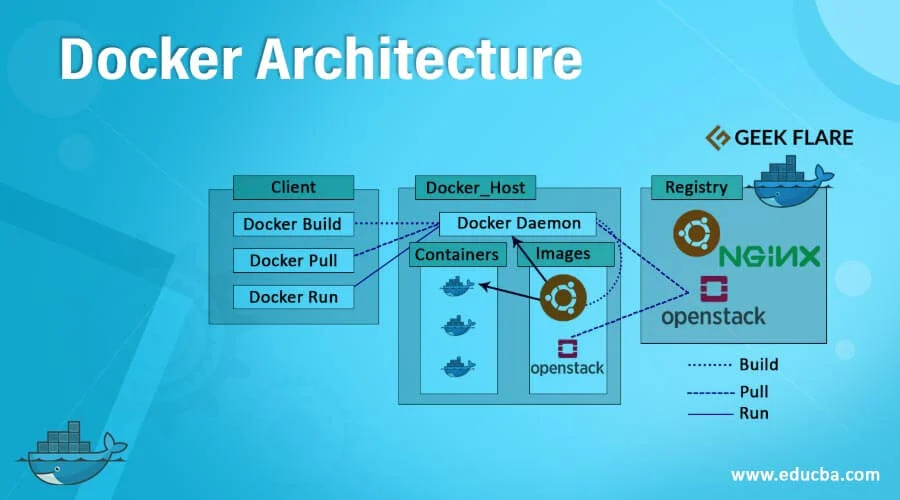
High-Level Docker Architecture Overview
Docker follows a client-server architecture.
It has three main components:
- Docker Client
- Docker Engine (Daemon)
- Docker Registry
These three pieces communicate continuously to create, manage, and run containers.
Let’s break each part down simply.
1. Docker Client: The Control Panel
The Docker Client is what you interact with.
When you run commands like:
docker build
docker pull
docker run
You are talking to the Docker Client.
What Does the Client Actually Do?
The client does not build containers itself. Instead, it:
- Accepts user commands
- Converts them into API requests
- Sends them to Docker Engine
Think of it as a remote control — not the TV itself.
2. Docker Engine: The Real Worker
Docker Engine is the heart of Docker.
It runs in the background as a service (daemon) and handles all heavy lifting.
Docker Engine Responsibilities
It:
- Builds images
- Creates containers
- Manages networks
- Controls storage volumes
- Talks to registries
In short: Docker Engine does the actual work.
Inside Docker Engine
Docker Engine itself has multiple parts:
Docker Daemon (dockerd)
This is the main background service.
It:
- Listens for client requests
- Manages containers
- Pulls images
- Allocates resources
If Docker Engine stops, everything stops.
REST API
Docker uses APIs to communicate.
This allows:
- CLI tools
- GUIs
- CI/CD pipelines
- Cloud platforms
To interact with Docker programmatically.
Container Runtime
Docker uses container runtimes (like containerd and runc) to actually create containers at OS level.
These runtimes:
- Create isolated environments
- Apply security rules
- Allocate CPU and memory
- Start application processes
This is where Linux magic happens.
3. Docker Registry: Image Storage Hub
Docker Registry is where container images live.
The most popular registry is:
- Docker Hub
But companies also use:
- Azure Container Registry
- AWS ECR
- Google Artifact Registry
- Private registries
What Happens When You Pull an Image?
When you run:
docker pull nginx
Docker:
- Contacts registry
- Authenticates
- Downloads image layers
- Stores locally
Next time, Docker reuses cached layers.
That’s why Docker is fast.
Understanding Docker Images vs Containers
This is critical.
Docker Image
An image is:
- Read-only template
- Blueprint
- Application snapshot
It contains:
- Application code
- Runtime
- Libraries
- Dependencies
- Configuration
Images do not run.
Docker Container
A container is:
- A running instance of an image
- Live process
- Isolated environment
You can create:
- Many containers from one image
- Each running independently
Image = Recipe
Container = Cooked dish
How Docker Architecture Works Step-by-Step
Let’s follow a real workflow.
Scenario: Running a Web App Container
You type:
docker run nginx
Here’s what happens behind the scenes:
Step 1: Client Sends Request
Docker Client sends request to Docker Engine API.
Step 2: Engine Checks Local Images
Docker Engine checks:
“Do I already have nginx image locally?”
If no:
Step 3: Engine Pulls From Registry
Docker Engine:
- Connects to Docker Hub
- Downloads image layers
- Stores them locally
Step 4: Container Runtime Starts Container
Docker Engine:
- Creates container filesystem
- Assigns network interface
- Sets CPU and memory limits
- Starts nginx process
Now the container is running.
All of this happens in seconds.
Docker Architecture Layers Explained
Docker is built on layered technology.
Let’s simplify it.
Layer 1: Operating System
Docker runs on:
- Linux
- Windows
- Mac (via virtualized Linux kernel)
Containers rely on the host OS kernel.
Unlike virtual machines, containers do not carry their own OS.
That’s why they’re lightweight.
Layer 2: Docker Engine
Manages:
- Images
- Containers
- Networks
- Storage
Acts as orchestration brain.
Layer 3: Containers
This is where applications live.
Each container gets:
- Isolated filesystem
- Network namespace
- Process namespace
- Resource quotas
But all share the same kernel.
Docker Networking Architecture
Containers need communication.
Docker provides built-in networking.
Default Networks
Docker creates:
- Bridge network (default)
- Host network
- None network
Bridge Network (Most Common)
Allows:
- Container-to-container communication
- Port mapping
- Internal DNS resolution
Example:
docker run -p 80:80 nginx
Maps container port 80 to host port 80.
Container Communication
Docker assigns:
- Internal IP addresses
- Automatic DNS names
So containers can talk using service names.
Perfect for microservices.
Docker Storage Architecture
Containers are temporary by default.
When container stops:
- Data disappears
Docker solves this using volumes.
Docker Volumes
Volumes:
- Persist data
- Live outside container lifecycle
- Are managed by Docker
Used for:
- Databases
- Logs
- Uploads
Example:
docker volume create app-data
Volumes decouple application and storage.
Docker Security Architecture
Docker architecture includes built-in isolation.
Namespace Isolation
Each container gets:
- Process namespace
- Network namespace
- File system namespace
This isolates workloads.
Control Groups (cgroups)
Limit:
- CPU usage
- Memory consumption
- Disk I/O
Prevents one container from crashing the system.
Image Signing and Verification
Docker supports:
- Trusted images
- Content trust
- Image scanning
Security is baked into the architecture.
Docker vs Virtual Machine Architecture
Let’s clarify the big difference.
Virtual Machines
Each VM includes:
- Full OS
- Kernel
- Drivers
- Libraries
Heavy. Slow. Resource expensive.
Docker Containers
Containers share:
- Host kernel
- OS resources
They only include:
- Application code
- Dependencies
Lightweight. Fast. Efficient.
Architecture Comparison
VM Stack:
Hardware → Hypervisor → Guest OS → App
Docker Stack:
Hardware → Host OS → Docker Engine → Container
That missing OS layer is why Docker wins speed.
Why Docker Architecture Is Perfect for Microservices
Modern apps use microservices.
Docker architecture supports this perfectly.
Benefits:
- Independent deployments
- Service isolation
- Horizontal scaling
- Easy rollback
- CI/CD friendly
Each microservice becomes its own container.
Loose coupling. Strong control.
How Docker Works With Kubernetes
Docker builds containers.
Kubernetes runs them at scale.
Architecture flow:
Docker → Image → Registry → Kubernetes → Cluster
Docker focuses on:
- Packaging
- Standardization
Kubernetes focuses on:
- Scheduling
- Scaling
- High availability
Together they power modern cloud platforms.
Common Docker Architecture Mistakes
Avoid these:
❌ Running everything as root
❌ Hardcoding secrets inside images
❌ Using huge base images
❌ Ignoring volume persistence
❌ Overloading single containers
Good architecture is intentional.
Best Practices for Docker Architecture
Professional teams follow these:
Use Lightweight Base Images
Prefer:
- Alpine
- Distroless
- Slim images
Smaller size = faster builds + less attack surface.
One Process Per Container
Don’t bundle everything.
Each container should do:
- One job
- One service
Makes scaling easier.
Externalize Configuration
Use:
- Environment variables
- Secrets managers
- Config files
Never bake secrets into images.
Version Control Dockerfiles
Treat Dockerfiles as code.
Review. Test. Improve.
Final Thoughts: Docker Architecture Is Simplicity With Power
Docker architecture is not complicated — it’s layered intelligence.
It separates:
- Build from run
- App from OS
- Environment from deployment
That separation gives you:
- Speed
- Stability
- Portability
- Predictability
Once you understand Docker’s architecture, containers stop feeling magical and start feeling logical.
And that’s when you move from using Docker…
to engineering with Docker.
