

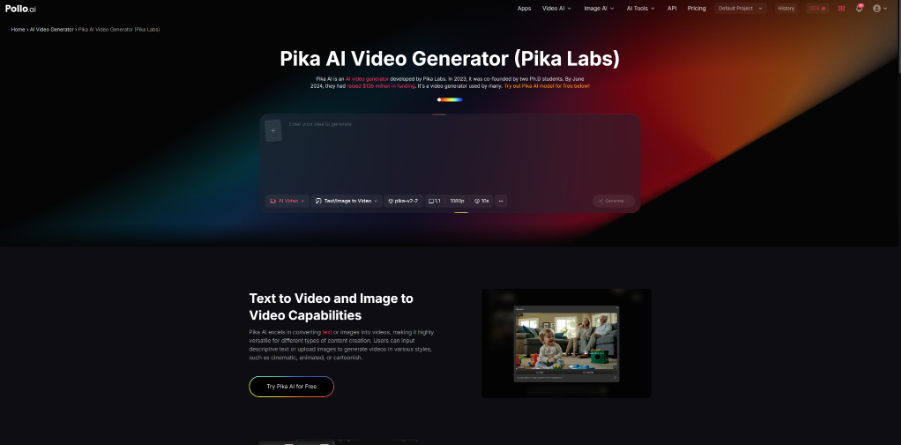
This review explores the Pollo AI Pika Art video generator powered by the Pika AI model from Pika Labs. It examines its text-to-video, image-to-video, Reference to Video, and Frames to Video capabilities, along with Pika Effects for creative transformations. The article also covers usability, performance, output quality, and real-world use cases such as social media content, marketing prototypes, and creative experimentation. Overall, it provides a balanced look at strengths in ease of use and speed, as well as limitations in video length and control.
Overview
The Pollo AI Pika Art video generator is positioned as a tool designed to transform static prompts or visual inputs into short AI-generated video clips. It sits within the broader category of text-to-video and image-to-video generation tools, where machine learning models interpret user inputs and synthesize motion, style, and scene transitions.
Unlike traditional video editing software, the Pollo AI Pika Art video generator does not rely on manual frame-by-frame editing. Instead, it uses generative AI models to interpret prompts and create motion sequences that attempt to simulate cinematic or stylized outputs. The system is typically used by content creators, marketers, and experimental designers who want to produce visual content without extensive production workflows.
At a high level, the Pollo AI Pika Art video generator reflects the current direction of generative media tools: reducing technical barriers while increasing dependence on prompt quality and model interpretation.
Features
Text/Image to Video
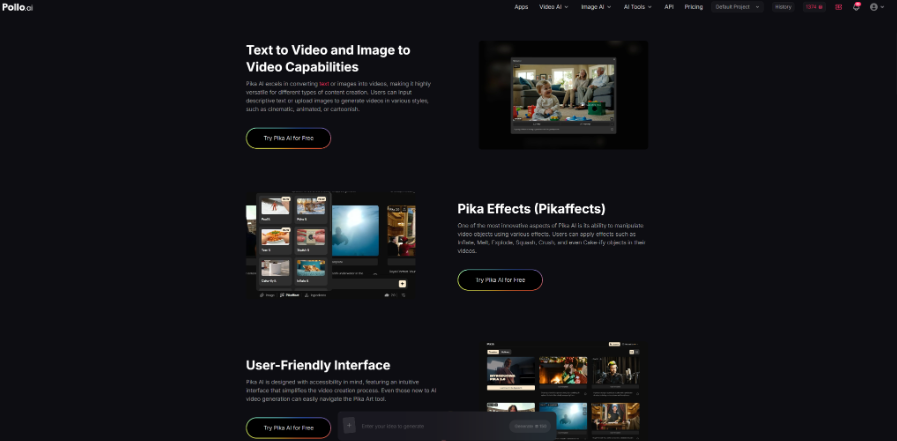
The Pollo AI Pika Art video generator supports Text/Image to Video generation, allowing users to input a text prompt or upload an image that the Pika AI Video Generator converts into a short animated video. Text prompts are interpreted into scenes and motion, while images are animated with added movement, camera shifts, or environmental effects, making it useful for both concept creation and visual enhancement.
Reference to Video
The reference to video enables users to guide video generation using a reference image, so the model follows the visual style, structure, or character design instead of relying only on text prompts. This helps maintain consistency across outputs, especially for character-driven content or branded visuals where a stable appearance is important.
Frames to Video
The Frames to Video feature allows users to upload multiple key frames that the system converts into a continuous video by generating motion between them. By defining start and end frames, users can influence scene progression and timing, offering more structured control compared to single-image generation while still relying on AI-based interpolation.
How to Use Pollo AI Pika Art Video Generator?
The typical usage flow of the Pollo AI Pika Art video generator can be broken down into three steps:
Step 1: Select the Pika AI model
Users begin by choosing the Pika AI model within the Pollo AI image-to-video or text-to-video interface. This selection determines the generation engine used for the output.
Step 2: Input image and prompt
Next, users upload an image or enter a text description. Additional parameters may be adjusted depending on available settings, allowing some level of control over style and output direction.
Step 3: Start video generation
Finally, users initiate the generation process. The system processes the input and produces a short AI-generated video based on the Pika model’s interpretation.
This simplified workflow is one of the reasons the Pollo AI Pika Art video generator is often considered accessible for beginners.
Performance and Output Characteristics
Ease of Use and Generation Speed
In practical use, the Pollo AI Pika Art video generator is notably simple to operate, with clear steps and minimal learning curve. The prompts required are straightforward, allowing even beginners to get started quickly. Video generation is also fast, making it suitable for rapid content creation without long waiting times.
Output Accuracy and Visual Quality
The system shows strong accuracy in understanding user inputs, often producing videos that closely match the intended prompt. Generated outputs appear natural and smooth, with complete character details, standard and consistent movements, and no obvious visual glitches or unnatural elements, resulting in a cohesive viewing experience.
Limitations in Video Length
One clear limitation is the restriction on video duration. The tool currently only supports short outputs, typically offering 5-second and 10-second options. While this works well for short-form content, it limits its use for longer or more complex video projects.
What Are the Best Use Cases for Pollo AI Pika Art Video Generator?
Social Media Content Creation
The tool is frequently used for short-form video creation, particularly for platforms that prioritize fast and engaging visuals. The combination of text-to-video and effects makes it suitable for experimental clips and viral-style content.
Creative Experimentation and Visual Exploration
Designers and digital artists use the Pika AI Video Generator to explore motion concepts and visual transformations. The Pika Effects system, in particular, supports abstract and surreal experimentation.
Marketing Prototyping and Concept Development
Marketing teams may use the tool to quickly visualize campaign ideas. These outputs are typically not final assets but serve as conceptual previews for storytelling and visual direction.
Educational Use and Idea Visualization
The simplicity of the system also makes it useful for educational environments, where it can demonstrate the basics of AI-generated motion and prompt-based design.
Why Choose Pollo AI Pika Art video generator
Easy-to-use workflow with fast results
The Pollo AI Pika Art video generator is designed to be straightforward, allowing users to create videos without advanced editing skills. By simply selecting the Pika AI model, entering a prompt or uploading an image, and clicking generate, users can produce videos in minutes. This makes it especially accessible for beginners while still being efficient for quick content production.
Flexible creation modes and creative control
The tool supports multiple generation approaches, including text-to-video, image-to-video, Reference to Video, and Frames to Video. This range of input methods gives users flexibility depending on their needs, whether they are starting from scratch, enhancing visuals, or guiding outputs with more structure.
Unique effects for stylized and engaging content
A standout feature is the Pika Effects (Pikaffects) system, which allows users to apply transformations like Inflate, Melt, Explode, Squash, Crush, and Cake-ify to objects within videos. These effects make it particularly suitable for creative, eye-catching, or experimental content, and while there may be some limitations in precision for complex scenes, the overall experience remains fast, versatile, and engaging for most use cases.
Conclusion
The Pollo AI Pika Art video generator, powered by the Pika AI Video Generator (Pika Labs), represents a practical example of current AI video generation technology. It combines ease of use with creative flexibility, particularly in text-to-video and image-to-video workflows.
Its strongest value lies in rapid ideation, short-form content creation, and experimental visual design. However, it is less suited for precise, high-end production work where consistency and control are critical.
As generative video systems continue to evolve, tools like the Pollo AI Pika Art video generator are likely to become more stable and controllable. For now, it functions primarily as a creative acceleration tool rather than a replacement for traditional video production pipelines.
